How to Offer Cashback at Your Store
Despite the rise of digital payments, physical cash remains a meaningful part of everyday commerce. According to the Federal Reserve's 2024 Diary of Consumer Payment Choice, cash accounted for 16% of all US consumer payments in 2023—and that share rises sharply for purchases under $25.1 At the same time, the average ATM surcharge hit a record $3.19 in 2024, with total out-of-network ATM costs averaging $4.77 per transaction when the cardholder's own bank also charges a fee.2 When a customer needs $40 and the nearest ATM charges nearly $5 in combined fees, they remember which store saved them from that charge. Offering cashback turns that memory into loyalty.
The good news: you almost certainly already have everything you need. No new hardware, no expensive contracts. Here's the whole picture.
What "cashback at checkout" actually means
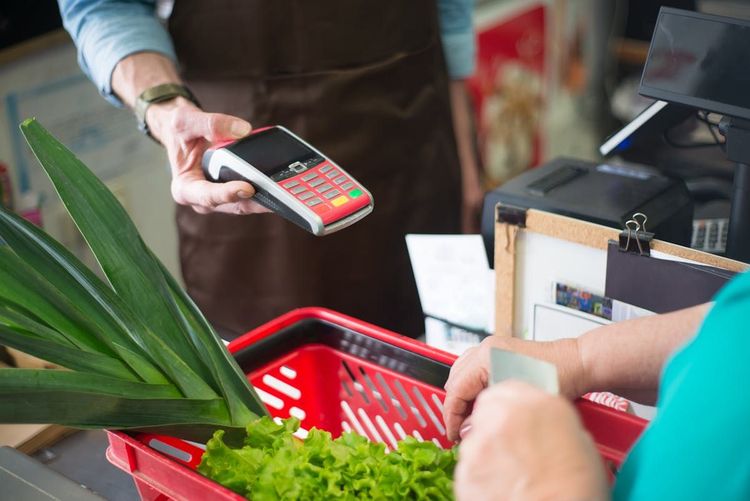
When a customer pays by debit card and requests cashback, your point-of-sale (POS) system adds the requested amount to their transaction total. You collect that extra amount on the card and hand back the equivalent in bills from your register. The card network (Visa, Mastercard) processes it as a single debit transaction—you're converting electronic funds into the physical cash you already hold.
No separate machine. No cash-advance fees for the customer. No float risk beyond your normal register float.
Step 1: Confirm your POS supports cashback
Most modern debit card terminals support cashback—but the feature is sometimes disabled by default. Check your terminal's settings menu or call your payment processor. Common systems that support it include Square, Clover, Verifone VX520, Ingenico iSC Touch, and virtually any EMV-compliant terminal manufactured after 2015.
If your processor charges a per-transaction fee for cashback, it typically falls in the $0.05–$0.15 range—a fraction of the $3.19 average ATM surcharge customers would pay elsewhere.2
Step 2: Set your cashback limits
Decide on a maximum amount. Most convenience stores and gas stations cap at $100–$200 per transaction. Your limit should reflect how much cash you can comfortably float in your register during a shift. Common limit tiers:
- $40–$60 — Low-volume stores or tight float
- $100 — Standard for most convenience stores and small grocers
- $200 — High-traffic locations near banks or transit hubs
Step 3: Train your staff
During checkout, the terminal prompts the customer to enter a cashback amount (or zero). The cashier counts out the bills alongside any change. The receipt shows the full transaction total including the cashback amount.
Two important points to brief staff on:
- Debit only, not credit. Cashback on a credit card is a cash advance subject to interest. Most terminals block this automatically, but staff should understand the distinction.
- No ID required. Cashback is a standard debit transaction, not a check-cashing or cash-advance service. Requiring ID creates unnecessary friction and has no regulatory basis.
Step 4: Make sure customers can find you
This is the step most stores skip—and the one that drives new foot traffic rather than just serving regulars.
The Federal Reserve's 2024 DCPC also found that more than 90% of consumers intend to continue using cash as either a means of payment or a store of value in the future.1 That's a large and durable audience actively seeking cash access. When someone searches "cashback near me," your store won't appear unless it's listed somewhere that indexes cashback availability.
Google Business Profile has a "services" section where you can explicitly list "cashback at checkout." Purpose-built directories go further: Cashtic is a real-time cashback-finder that shows shoppers which nearby stores offer cashback, their current limits, and hours—converting urgent cash needs into walk-in traffic for enrolled stores.
What does it cost you?
| Item | Typical cost |
|---|---|
| Terminal configuration change | $0 |
| Per-transaction processing fee | $0.05–$0.15 (often waived) |
| Additional float required | $0 (uses existing register cash) |
| Staff training | ~15 minutes |
Security considerations
Cashback transactions run on the same encrypted, tokenized infrastructure as any other debit purchase—there is no additional fraud surface compared to a standard card payment. Each cashback disbursement is matched to a card transaction in your POS system and is fully auditable. Disputed cashback transactions follow the standard card-network chargeback process.
The bottom line
Offering cashback requires minimal investment and addresses a genuine, persistent need: the Federal Reserve's data shows cash is still used in roughly 1 in 6 US consumer transactions, with a majority of consumers committed to using it for the foreseeable future.1 Configure the feature in your terminal, set a sensible limit, brief your staff, and list your store on directories like Cashtic so the customers searching for free cash access right now can find you.
References
- Federal Reserve Financial Services. 2024 Findings from the Diary of Consumer Payment Choice. Federal Reserve Financial Services, 2024. https://www.frbservices.org/news/research/2024-findings-from-the-diary-of-consumer-payment-choice
- Goldberg, Matthew. Bankrate's 2024 Checking Account and ATM Fee Survey. Bankrate, 2024. https://www.bankrate.com/banking/checking/checking-account-survey-2024/